FlowMinder
A real-time meeting agenda assistant for Zoom.
Overview
FlowMinder is a full-stack Zoom app built to keep meetings structured, visible, and on schedule. It acts like a shared agenda and timing layer for Zoom meetings: hosts can plan topics ahead of time, manage timers during the meeting, and publish updates in real time, while participants can follow the meeting flow without relying only on one host’s screen share or verbal updates.
The product came out of a real meeting problem: discussion flow is often unclear, time is easy to lose track of, and participants do not always have a shared view of what is happening. That direction was later validated when Zoom introduced its own agenda and timer features in the same space.
I built FlowMinder with a team of four — Dom Chaloeisak, Hamudi Jesri, Sarah Bicky, and myself, mentored by Eric Berkovsky — as our submission to Penn’s SPARC 2025 competition.
My contribution:
- Zoom Meeting SDK browser embed — the hardest technical problem on the project. Its DOM requirements weren’t compatible with React 19, and even downgrading to React 18 couldn’t get a fully standalone, Zoom-client-independent web app rendering reliably. We pivoted within about a week to building around the actual Zoom client experience instead.
- Zoom Meeting SDK JWT signing & ZAK handling — the backend signature/authorization logic that lets a client actually join a meeting through the SDK (see Zoom Integration below).
- Meeting-scheduling pipeline — posting meetings and agenda items to the database, plus redirect fixes on top of the OAuth flow.
- Deployment — the Vercel/Render setup for both apps.
The app combines a Next.js 15 + TypeScript frontend, an Express 5 backend, Socket.IO for real-time sync, and PostgreSQL for persistence, along with the Zoom Apps SDK, Zoom Meeting SDK, and Zoom OAuth + REST APIs for meeting context, authentication, and meeting-linked workflows. The frontend deploys on Vercel and the backend on Render.
Core Features
- Dual entry experience: Supports both browser-based planning and in-meeting use through the Zoom app sidebar.
- Real-time agenda sync: Broadcasts agenda progression, timer updates, and meeting flow changes live to connected participants.
- Host-controlled publishing: Lets hosts stage agenda edits locally and only reveal finalized updates after saving.
- Late-joiner clarity: Keeps the active agenda item visible so participants can quickly understand the current topic.
- Timer automation: Hosts can configure per-meeting timer behavior — auto-advance to the next agenda item when a timer ends, auto-start the next timer, and control whether the timer is visible to all participants or the host only.
- Nudges (known limitation): Lets participants anonymously signal ”speak up” or ”speak less” to another participant without disrupting the meeting. Per-user voter identity isn’t fully wired to real Zoom user context yet, so cooldowns aren’t reliably per-person — a gap the team flagged during the build rather than a finished feature.
Architecture
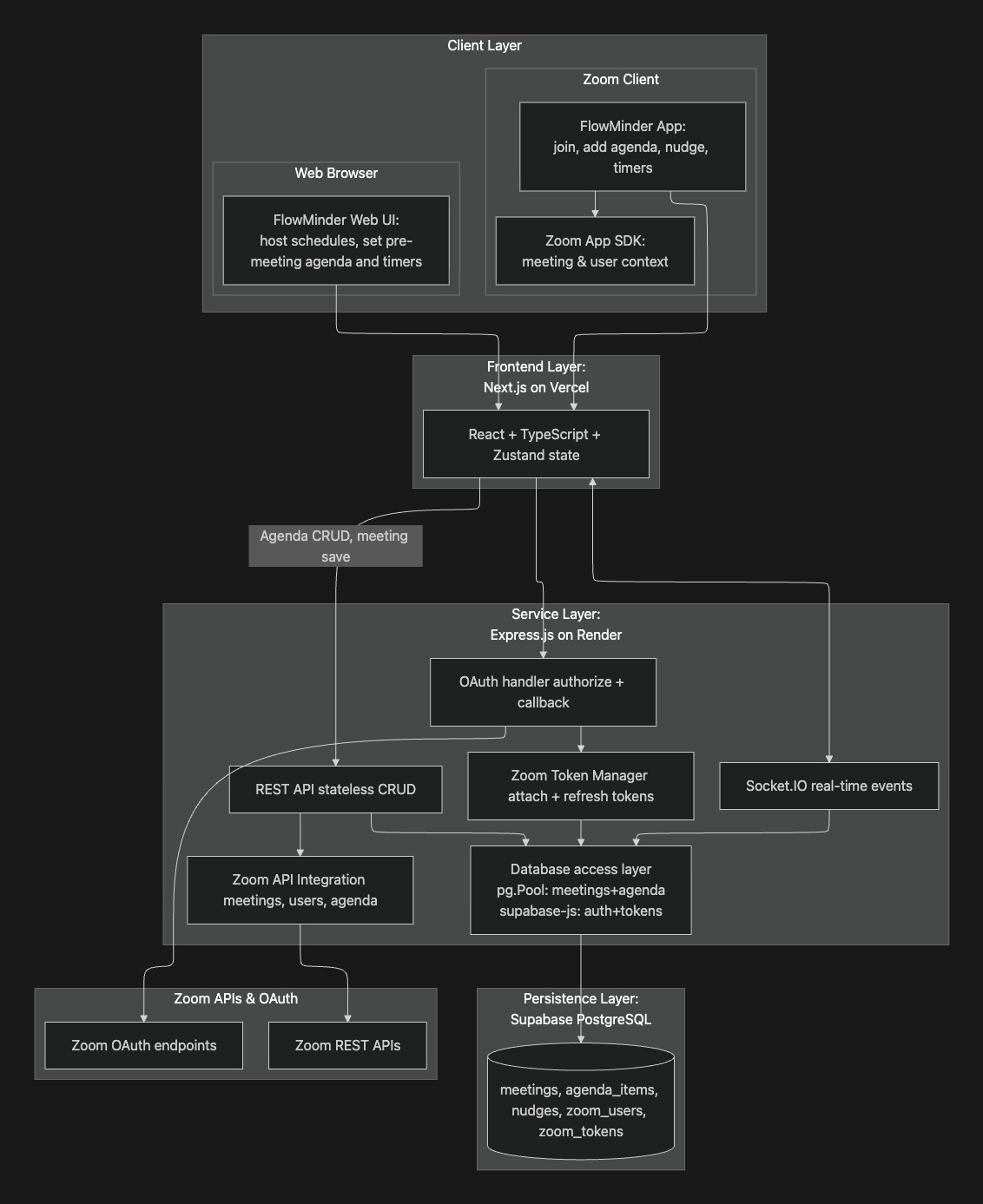
FlowMinder uses a three-part architecture:
- Frontend (Next.js / React / TypeScript / Tailwind / Zustand): Renders host and participant views, manages local UI state, and handles meeting setup flows.
- Backend (Express + Socket.IO): Exposes REST APIs for meeting and agenda operations while synchronizing live meeting state across users.
- Database (PostgreSQL + Supabase): Operational meeting data — meetings, agenda items, nudges, and participant history — is stored in PostgreSQL accessed via the
pgdriver. Supabase handles OAuth state separately, storing Zoom access and refresh tokens via the Supabase JS client. These are two distinct connections with distinct responsibilities.
The Zoom Meeting SDK is isolated to a single embedded-session route, so it’s only ever loaded when a user actually joins a meeting in-browser. The Zoom Apps SDK calls are used wherever meeting context is needed but simply no-op outside of a Zoom session, which keeps lighter pages like login and scheduling functional without pulling in unnecessary overhead.
Real-Time Sync Model
FlowMinder uses Socket.IO instead of polling so the server can push agenda, timer, and nudge updates immediately to all connected clients.
- Timer: Entirely server-authoritative. The server stores the timer’s end time as an absolute epoch timestamp (
endAt) and includes aserverTimefield in every broadcast. Clients measure clock skew on receipt —skew = serverTime - Date.now()— and apply it on every display tick:remaining = endAt - (Date.now() + skew). This keeps all participants’ countdowns synchronized regardless of local clock drift. Clients also re-request timer state every 10 seconds while a timer is running. Timer state and nudge cooldowns live in server memory rather than the database, which keeps them fast but means a backend restart clears any timers currently running. - Agenda: Includes a version counter on every broadcast, so out-of-order or stale updates are identifiable. Edits use optimistic local state in the host view — a Zustand store tracks
isNew/isEdited/isDeletedflags per agenda item so changes are visible only to the host until saved, at which point the server reads from the database and broadcasts the authoritative snapshot to the room.
Zoom Integration
Inside the meeting, the app uses two Zoom SDKs for different surfaces.
- Zoom Apps SDK (sidebar): Runs in the Zoom app sidebar, providing
getMeetingContext(),getUserContext(), andgetMeetingUUID()to resolve meeting identity and participant role. - Zoom Meeting SDK (browser embed): Supports embedded full meeting sessions in the browser — I built this end-to-end, including the signing flow. Joining requires a server-generated JWT signature: the backend signs a payload with the SDK Client Secret using HS256, specifying role (0 = attendee, 1 = host) and a one-hour expiry. Hosts additionally require a ZAK (Zoom Access Key) fetched via the Zoom REST API.
- Zoom OAuth & REST APIs (outside the meeting): Support authentication, meeting scheduling, and agenda preparation, keeping the in-meeting experience lightweight while still supporting pre-meeting planning in the browser.
Security & Engineering Lessons
- Role enforcement: OAuth tokens are stored in Supabase and never exposed to the client. Role separation is enforced at the UI layer — the Zoom Apps SDK’s
getUserContext()identifies whether the caller is host or attendee, and the client renders host-only controls accordingly. Server-side socket and REST endpoints do not currently re-validate role, which is a noted area for hardening. - Real-time vs. host control: The main engineering challenge was balancing real-time collaboration with host control. The staged-save workflow solved that by separating private host edits from the live participant view, keeping the shared state responsive without becoming chaotic.
- Race conditions: Early on, the current meeting was tracked as a single variable the backend held in memory, and every client that loaded the page would try to set it — whichever request landed last won, which could point different users at different meetings. We fixed that by having each client resolve its own canonical meeting ID through one sync call instead of mutating shared server state. Agenda item ordering had a similar issue: it was originally computed on the client, so two people adding items around the same time could land on the same position. We moved that calculation onto the server so there’s a single authoritative source for order, and guarded component-mount data fetches with a
useEffectcleanup flag so a stale async response couldn’t overwrite newer state after a re-render or unmount. - Process discipline: Beyond the code itself, a lot of the friction was process: none of us had used Git branches and pull requests together at this scale before, and mismatched package versions between branches caused compile errors on merge more than once. We fixed that by making local builds and rebasing a habit before every push, adding a short PR checklist, and gating deploys on a pre-production build passing on both frontend and backend.
- Testing: Verification was mostly manual — REST endpoints were tested with Postman and curl, Socket.IO events were checked live across multiple clients, and the full flow was run end-to-end inside real Zoom meetings. Unit tests (Jest + React Testing Library) cover the core agenda state logic on the frontend, but automated coverage is otherwise thin — a known gap rather than a finished test suite.
Future Improvements
- Analytics: Track timer usage, agenda drift, and nudge activity over time.
- Speaker ownership: Assign agenda items to presenters.
- Time extension workflows: Let participants vote to continue discussion.
- Cross-platform support: Extend the model beyond Zoom.
- Socket scaling: Add Redis-backed socket coordination for larger meeting volume.
Repository
Repository: github.com/evanlaw-dev/flowminder-app